Kinara
Your trackpad. Now with edges.
A one-finger clipboard, a fader for every app and 53 shortcuts. All from the edges you never touch.
Free and open source. macOS 13 or later.
Double‑tap. Slide. Lift.
Your recent copies, pictures too, are one corner away. Type to find one.
Turn one app down.
The edge lowers only the app in front. Everything else keeps playing.
And the basics, perfected.
Volume on the right. Brightness on the left, and the screen follows.
Corners do the rest.
Paste, Mission Control or any of 53 actions, and every app can have its own.
Get the highlights.
Clipboard history. Double-tap a corner and slide through your recent copies, pictures included, or just type to find one. Lift to paste.
Corners that do things. Double-tap or tap and hold. One finger is enough.
It knows a palm from a finger. Every touch is checked for intent, and every app can have its own edges.
A fader for every app. Mute one, solo one, and calls lower everything else.
Feels built in. Fine control, speed-sensitive steps and haptics up to Strongest.
The film
See it in motion.
Mixer
Every app gets its own fader.
Turn one app down without touching the rest, right from the menu bar.
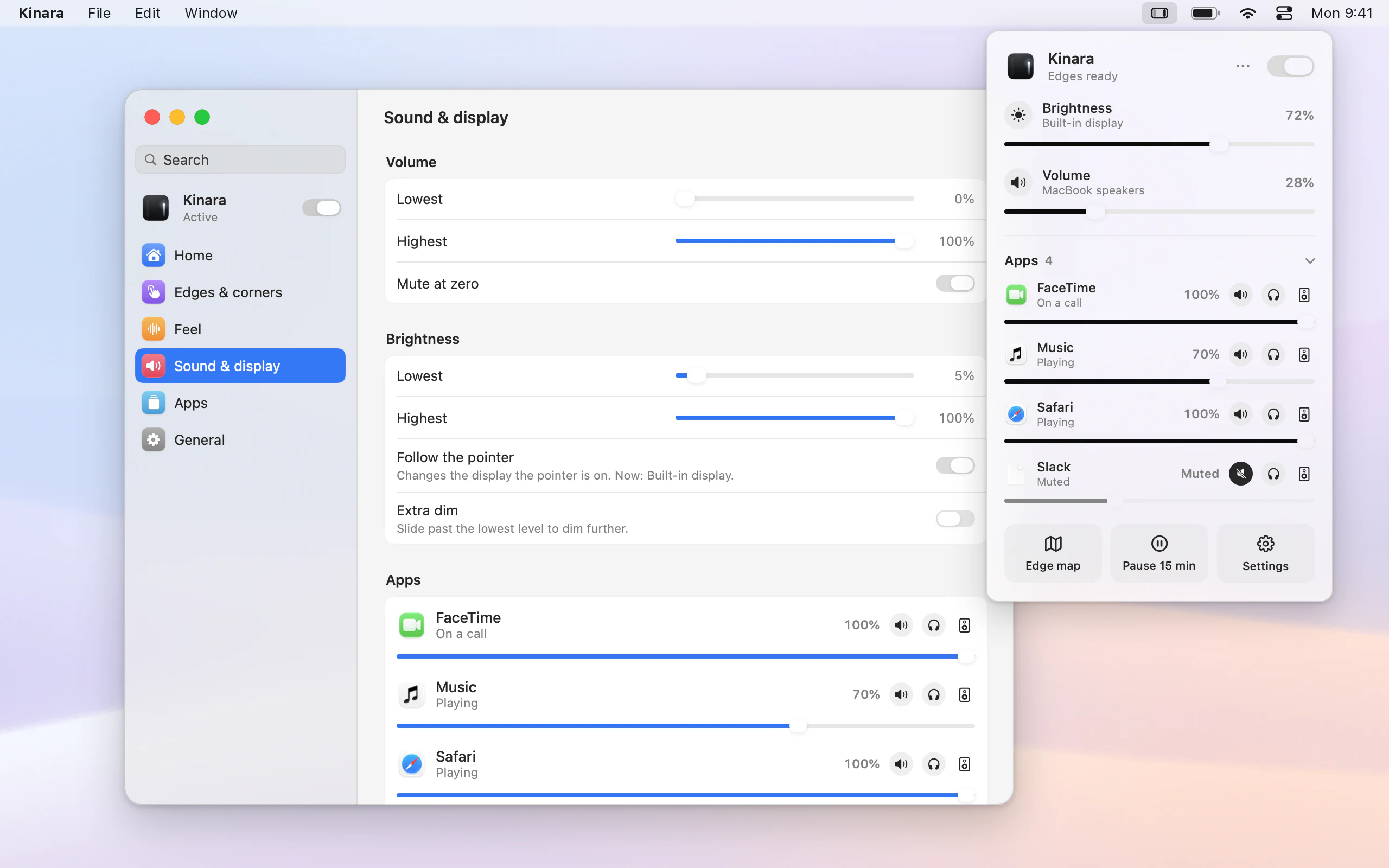
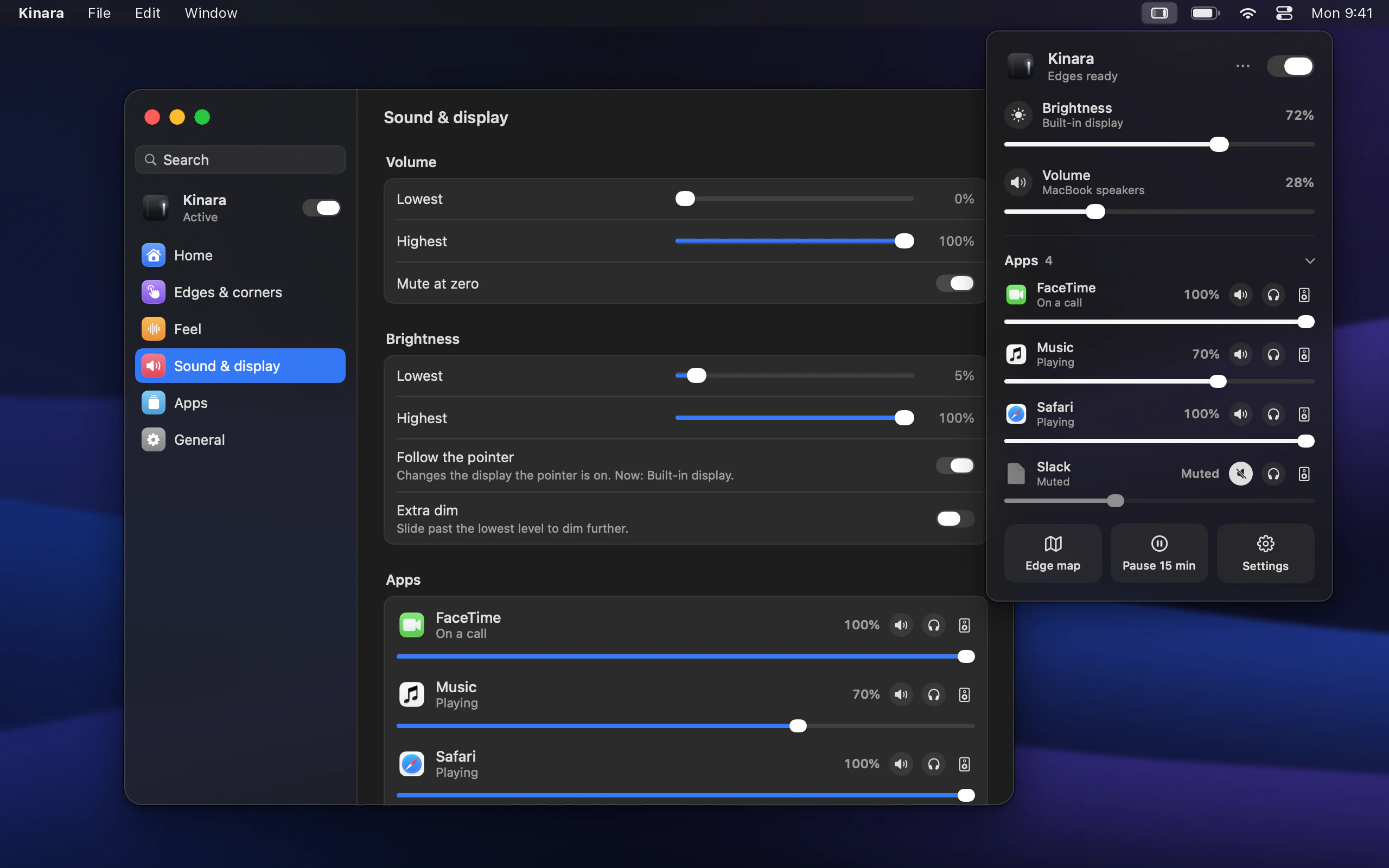
- Solo a call.Silence everything except the app you’re talking in.
- Calls lower the rest.When an app uses the microphone, everything else fades to the level you set.
- Boost to 150 percent.Make a quiet video louder without touching the system volume.
- Send it anywhere.Music to your AirPods while the call stays on the speakers.
The mixer needs macOS 14.2 or later. Audio is adjusted as it plays and never recorded.
Audio apps
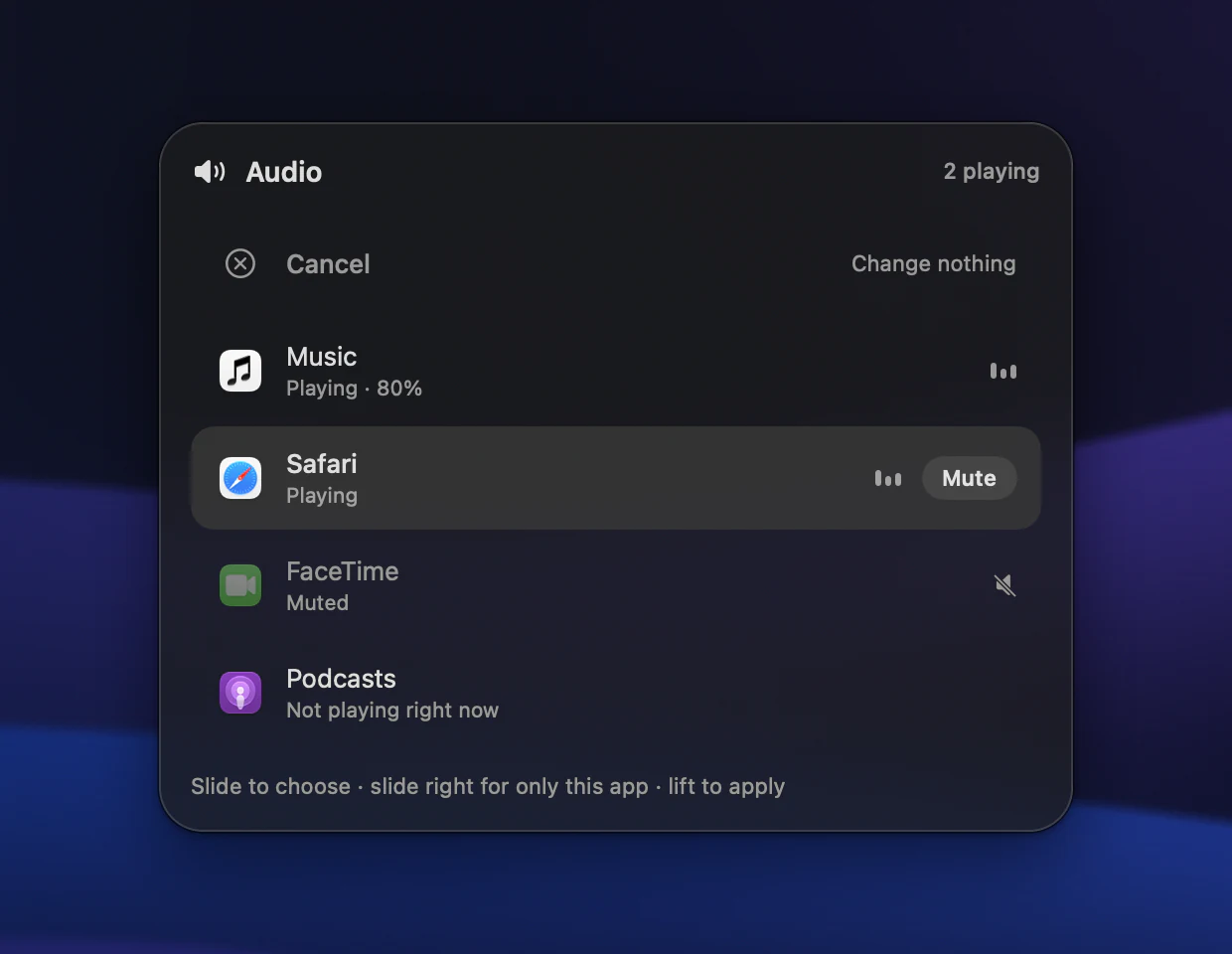
Mute any app from a corner.
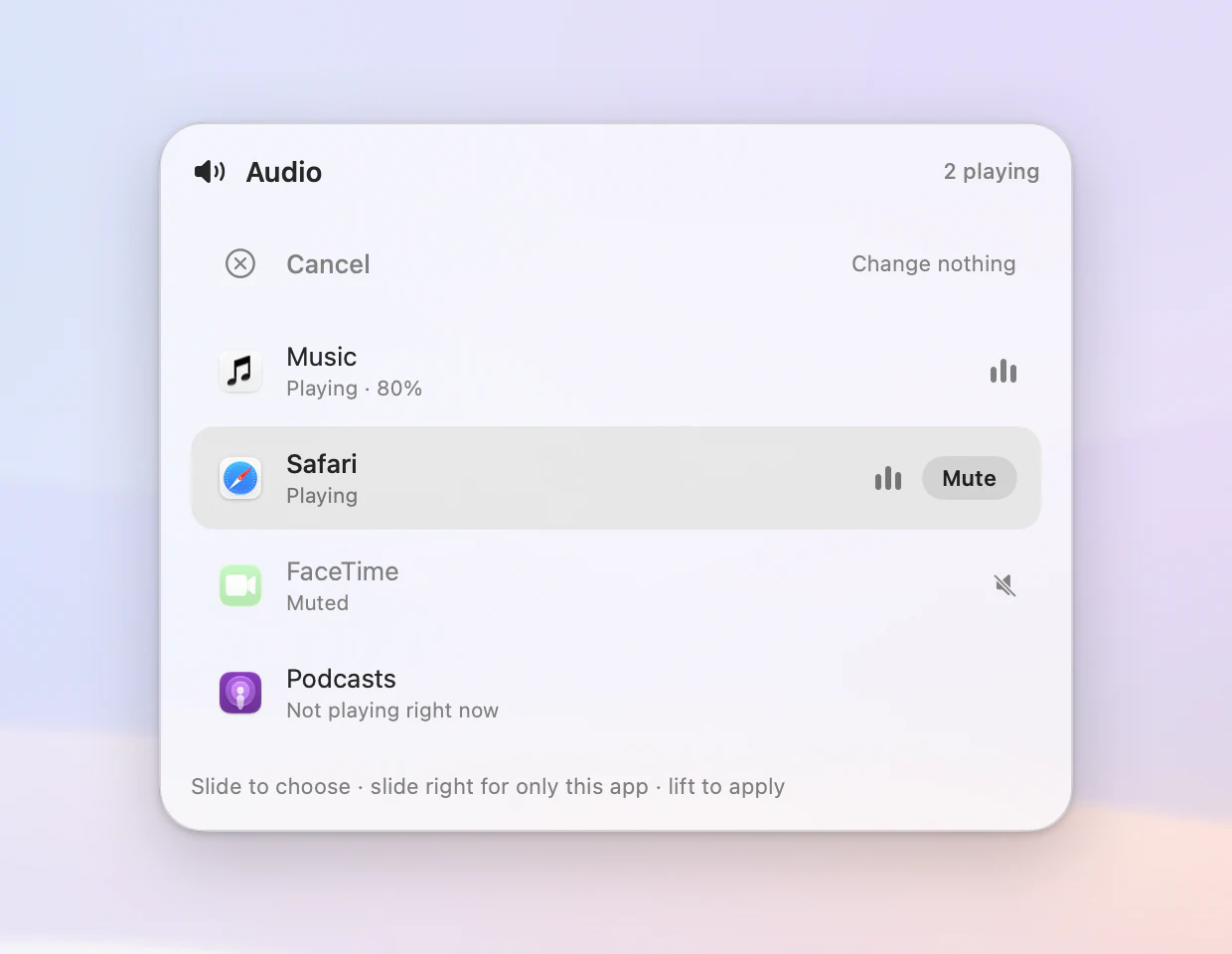
Double-tap a corner and every app making sound is right there. Slide to one, lift, and it goes quiet.
- Slide right for only this.Everything else goes quiet, so a call or a song plays alone.
- See what’s playing.Each app shows whether it’s playing, muted or waiting, with live levels.
- Undo just as fast.Muted apps stay in the list, one lift from playing again.
Little things
Answered in the corner you tapped.
A tap draws one piece of glass out of the matching corner of your screen. It names the action, shows what happened and slips back. Try it here.
Click a corner twice. Hover on one to preview it. Move along an edge.
- One piece of glass.The first tap draws a bead in the matching corner of your screen. The second stretches it into a pill naming the action.
- Results land in the pill.“Safari muted” or the song that started, right where you tapped. Nothing else pops up.
- Rest to preview.Keep a finger still on a corner to see what its taps do. Nothing runs until you tap.
- Repeat to undo.Do the same tap within 2 seconds and things go back: a mute, Mission Control, even a paste.
- Light where you touch.A faint light answers a first tap and a bright one the second. Slide along an edge and a soft one follows your finger.
- Ticks you can feel.The trackpad ticks twice when a tap fires, so you know it worked without looking.
- It says where to change it.The first time a corner fires, a second line names the spot and where to change it. After that, how to undo.
- A tour that waits for you.The first run shows each gesture on your screen beside a small trackpad, and moves on when you do it.
Prefer the usual indicator? Tap feedback can show in the corner or in the indicator, and the edge and corner light can be turned off, both in Settings.
Built like it came with your Mac.
- 53actions
Any of them on any edge or corner, and a different set for every app.
- 0.014%CPU at rest
Measured on an M4 MacBook with gestures paused and the menu closed.
- 11.6 MBof memory
Same Mac, same measurement.
- 50%notch
Turn it on and levels pause at the middle, or at your favorite, with a tap you can feel.
- 60%headphone limit
Give each output its own ceiling. Speakers can still go to 100.
- 2 sto undo
Repeat a tap within 2 seconds and it puts things back, whether it muted an app or opened Mission Control.
- 0.7 sto preview
Rest a finger on a corner that long and its pill shows what the taps do, without doing it.
- Strongesthaptics
From the trackpad’s own actuator: a tick for each step, and two when a tap fires.
- 0analytics
No tracking. Clipboard history lives in memory and leaves when you quit.
Kinara for Mac.
Free. Open source, for good.
- Free, every featureNo trial, no account and no ads. Nothing to unlock.
- Open sourceRead every line on GitHub, under the MIT License.
- Signed updatesInstalled only when you say so, from the same releases.
Questions? Answers.
Which Macs does it work with?
Any Mac with a built-in or Magic Trackpad on macOS 13 or later, Apple silicon or Intel. The per-app mixer needs macOS 14.2.
Will it get in the way of normal use?
The middle of the trackpad stays yours. Edges answer only a deliberate swipe that starts at the edge, and palm protection checks every touch.
How do I know a tap worked?
A glass pill grows out of the matching corner of your screen and names the action, and the trackpad ticks twice. Results such as “Safari muted” or the song that started appear in the same pill. If you prefer, Settings can show them in the indicator instead.
What if I tap a corner by mistake?
Do the same tap again within 2 seconds and it’s undone. To check a corner first, rest a finger on it: its pill shows what the taps do without running anything.
Why did play do nothing in Safari?
macOS sometimes puts a background Safari tab to sleep, and a sleeping tab misses the play command. Kinara tells you when that happens, and the next press opens Safari so the tab wakes and catches up.
Does Kinara show in the Dock?
Only while one of its windows is open, such as Settings, so ⌘-Tab can find it. The rest of the time it stays in the menu bar.
Can it keep pictures, and how many copies?
Yes. Screenshots and copied pictures sit beside your text and paste back exactly as you copied them. Keep 10, 20, 50 or 100 copies, or leave pictures out, in Settings. When the picker opens, just type to find one, and ⌘1 to ⌘9 paste the first nine.
Does it record anything?
No. Clipboard history lives in memory and is gone when you quit, audio is never recorded or saved, and there are no analytics.
Is it really free?
Yes, every feature, for good. Kinara is open source under the MIT License: no trial, no account and no ads.
Where is the source code?
On GitHub, with the releases, the tests and the notes on how each release is built and signed. Bug reports, ideas and pull requests are welcome there.